


Partner integration docs
Partner API documentation and reporting endpoints
The partner API documentation explains how affiliates can retrieve statistics, export links, monitor exchange history and work with partner reporting inside ObminMe. The page is intended for developers and business owners who need programmatic access to referral data and performance metrics.
It describes the endpoint format, request parameters, authentication details and typical response structure for partner tools. Reading the guide before implementation helps prepare the correct API workflow for dashboards, custom reports and automated partner accounting.
- Endpoints for partner info, exchanges, referrals and exported links.
- Authentication details, request parameters and response examples.
- Technical guidance for reporting, dashboards and automated analytics.
Before connecting the partner API to production reporting, verify your keys, request format and expected response fields on a test setup.
Integration with monitoring
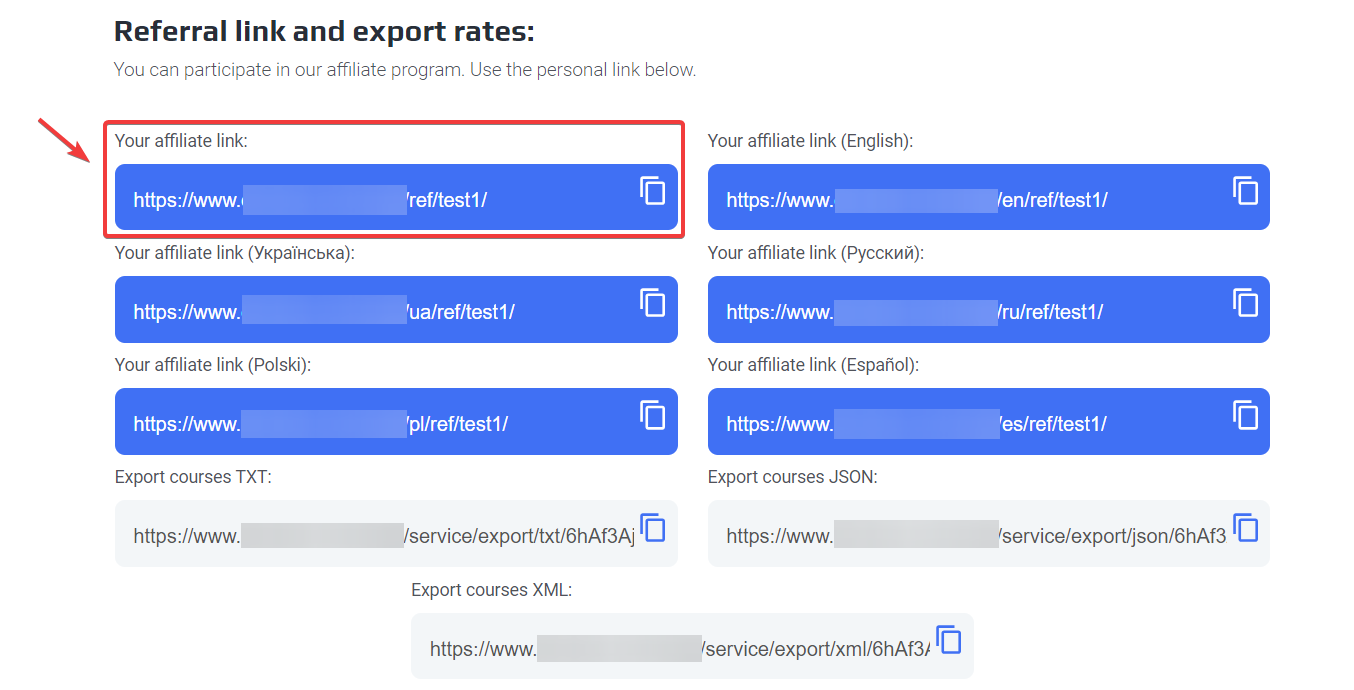
To get your partnership link, you need to enter your account using email and password then go to 'profile' section 'partnership program' and your partnership link is located below.
The exchange item can take Cur_from and Cur_to GET parameters, transmitted from monitoring at the time of the user transition to the exile to the exchanger website.
When the user is moving from monitoring, the Cur_from and Cur_to GET-parameters can be added to the URL of the exchanger’s URL.As names of currencies, short letter codes are used.These data must be used to redirect the user to the page of the exchange direction selected by the user earlier in monitoring, or for an automatic substitution of selected currencies in the lists of choice.
Example link with parameters: https://www.obmin.me/ref/XXXXXX/?cur_from=PMUSD&cur_to=BTC
Links to export courses:
https://www.obmin.me/service/export/xml/:code
JSONhttps://www.obmin.me/service/export/json/:code
TXThttps://www.obmin.me/service/export/txt/:code
API for partners
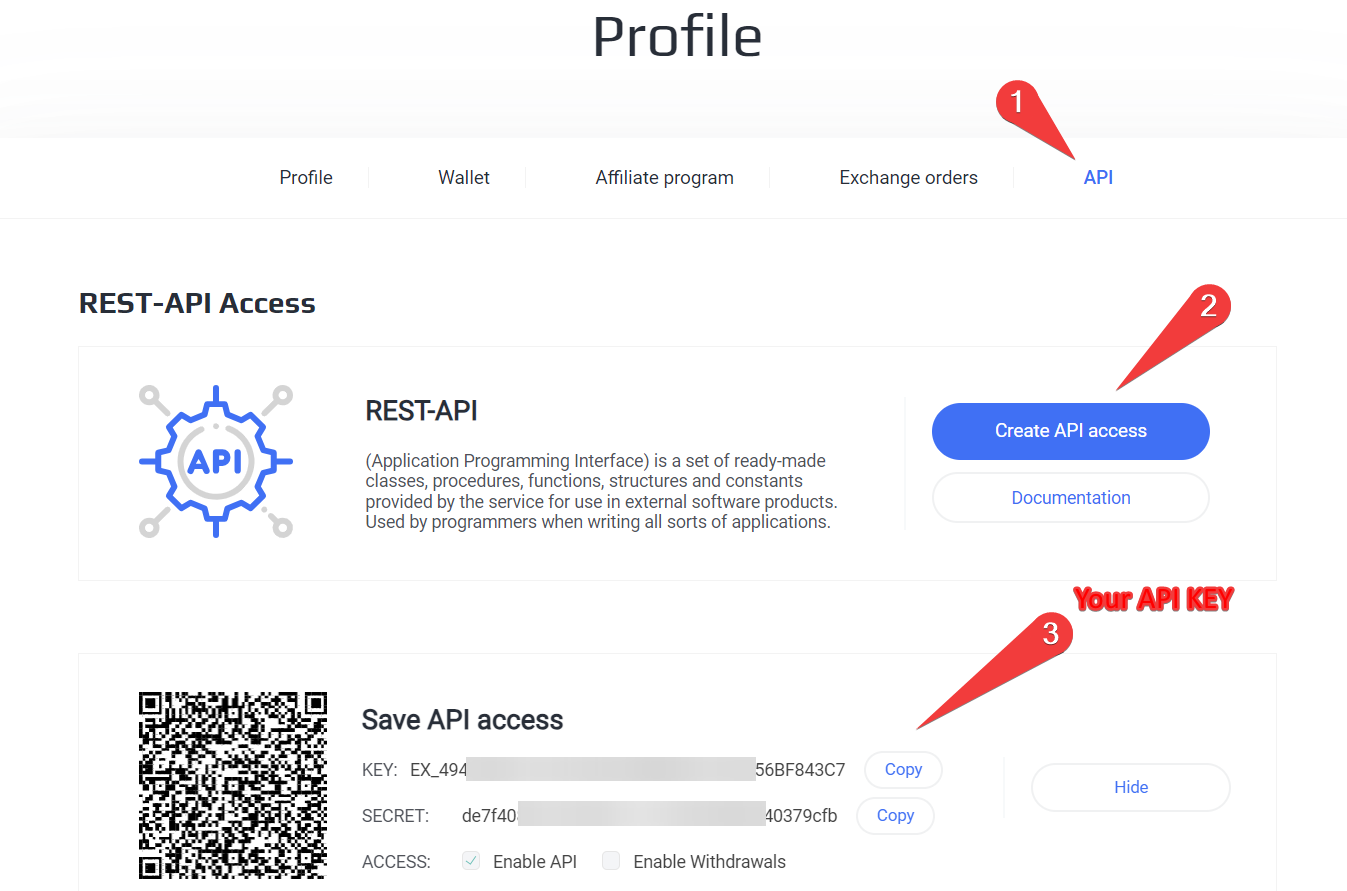
How to get API-Key?To get your partnership link, you need to enter your account using email and password then go to 'profile' APIs and click on the 'Create API Access' button' after copying the data that will appear below there will be your API Key.
URL: https://www.obmin.me/service/partner/api.php
api_action – pp api_key – Your personal key method – Module APA methodThe link to the API will look approximately as follows:
get_info - Information about the account and payment methods
Options:
| Name | Type | Required | Description |
| Additional parameters are not accepted | |||
Result:
{
  status: "success",
  error: 0,
  error_text: "",
  data: {
    balance: 15,
    totalReceived: 0,
    link: "test",
    min_payout: 99999999,
    items: { },
  },
}
get_exchanges- Your partnerships
Options:
| Name | Type | Required | Description |
| start_time | Integer | No | the time from which to display data (unix) |
| end_time | Integer | No | the time to which display data (unix) |
Result:
{
  status: "success",
  error: 0,
  error_text: "",
  data: {
    items: {
      1895: {
        id: 1895,
        time: 1590356264,
        date: "2020-05-24 21:37:44",
        course_give: 0,
        course_get: 241.57,
        amount_give: 0,
        amount_get: 241.57,
        exchange_success: 1,
        accrued: 1,
        partner_reward: 0,
        user_hash: "1r7",
      }
    }
  }
}
get_links- Partnerships
Options:
| Name | Type | Required | Description |
| start_time | Integer | No | the time from which to display data (unix) |
| end_time | Integer | No | the time to which display data (unix) |
Result:
{
  status: "success",
  error: 0,
  error_text: "",
  data: {
    items: {
      1631577600: {
        id: 1631577600,
        time: 1631577600,
        date: "2021-09-14 00:00:00",
        browser: "Unknown",
        ip: "0.0.0.0",
        referrer: "",
        user_hash: "613fe600",
        query_string: ""
      }
    }
  }
}